Media & Content
How Techparser Built a Dashboard a Small Team Uses to Run a Content App
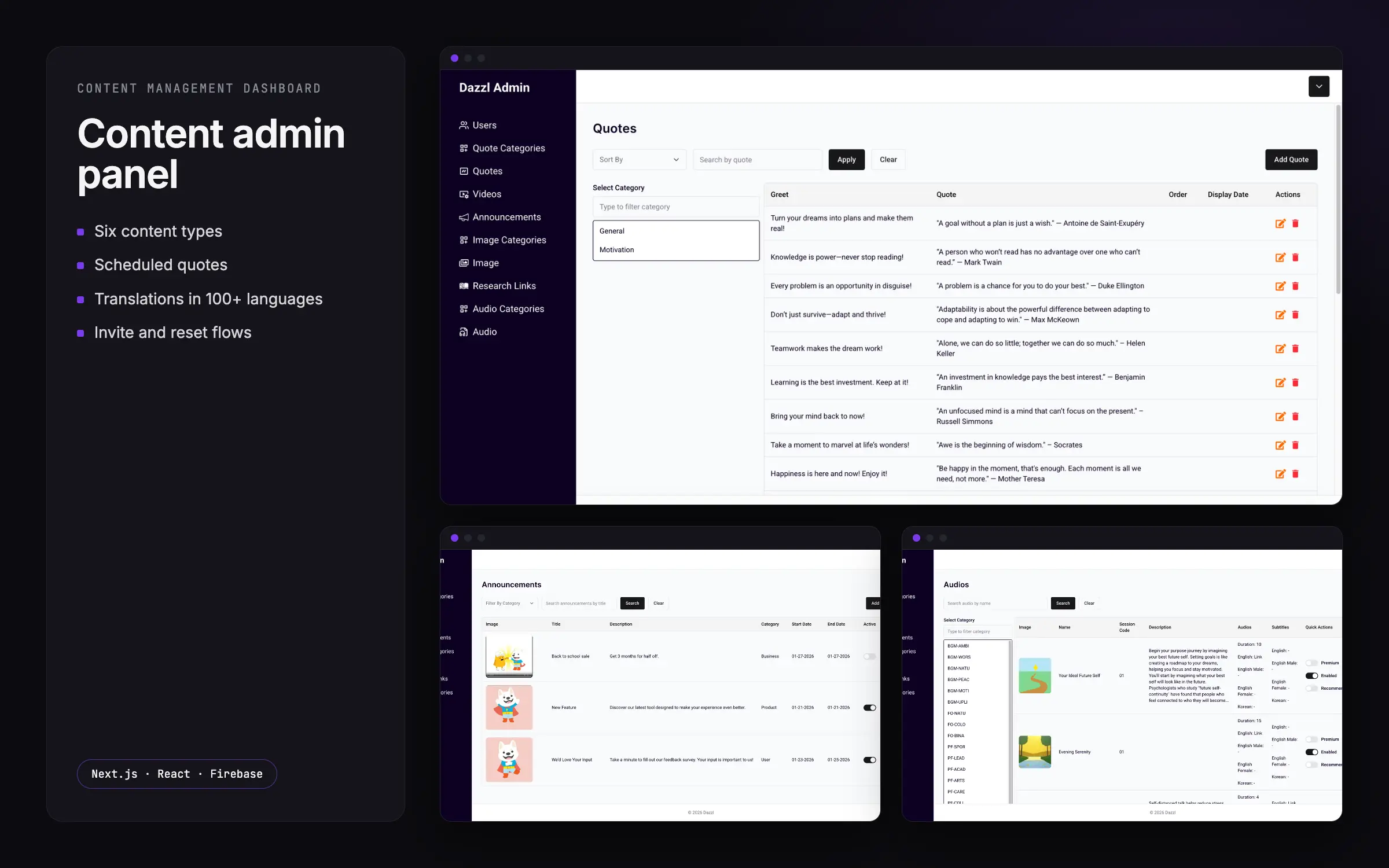
Techparser built one dashboard where a small team manages a content app's quotes, announcements, images, video, audio and research links in six content types.
- Client
- Content app (name withheld)
- Industry
- Media & Content
- Timeline
- Delivered
- Team
- 1 senior full-stack engineer
Results
- 6 content types
- Quotes, images, video, audio, announcements, research links
- 100+ languages
- Translations added one language at a time
- 3 roles
- Owner, admin or viewer gate every page
The problem
A small team runs everything a content app shows, from quotes and announcements to images, videos, audio and research links, from one dashboard, without an engineer for day-to-day content. Techparser built that dashboard. Six content types each have their own categories, ordering, display dates and status. Content ships in many languages, and new team members have to set up their own accounts by email, without an admin choosing their password.
The app is only as current as the team can keep it. Deleting a category must not leave content pointing at something that no longer exists, and invited users need a secure way to set and reset their passwords. The dashboard had to stay fast as content grew and keep its data consistent whatever the team changed.
What Techparser built
- Quotes, announcements, images, videos, audio and research links each have their own screens, with categories for quotes, images and audio and an order and display date on quotes so the app shows the right one on the right day.
- Search runs against a lower-cased copy of each title kept on write, so it is case-insensitive without scanning everything, and lists page through results with an exact total.
- Quotes, greetings and image names carry translations alongside the original text, added one language at a time from a list of more than a hundred languages.
- Removing a category updates every item that used it in one batch, so no content is left pointing at a category that no longer exists.
- Emptying a field on edit removes it from the record instead of storing an empty value, so the app never shows blank placeholders.
- Every dashboard page is gated by role (owner, admin or viewer), user management is limited to owners and admins, and any page not explicitly mapped is denied.
- New team members receive a time-limited link to set their own password, a forgotten password works the same way, and passwords are stored only as bcrypt hashes.
Decisions that mattered
Deletes and edits that keep data consistent
A content app looks broken the moment an item points at a category that no longer exists or shows a blank placeholder. Techparser handled both at the data layer rather than hoping the UI stayed tidy. Removing a category updates every item that used it in one batch, so nothing is left dangling. And emptying a field on edit removes it from the record entirely instead of writing an empty value, so the app never renders a blank where content should be. Consistency is maintained whatever order the team changes things in.
Self-service accounts, without an admin holding passwords
New team members had to onboard themselves by email, which rules out an admin choosing passwords and rules out storing anything recoverable. Techparser used time-limited links: an invited user sets their own password through a link, a forgotten password is reset the same way, and passwords are kept only as bcrypt hashes. Access is then gated by role on every page, owner, admin or viewer, with user management limited to owners and admins and any page not explicitly mapped denied by default. The team runs its own membership without an engineer.
Translations and search built for how the team works
Content ships in many languages, so translations live on each item rather than in separate files: quotes, greetings and image names carry their translations alongside the original, added one language at a time from a list of more than a hundred. Search had its own constraint, since scanning every record as the library grows is slow. Techparser keeps a lower-cased copy of each title on write, so search is case-insensitive without a full scan, and lists page through results with an exact total. Both choices keep the dashboard usable as content grows.
Outcome
The dashboard was delivered to the team. From one place they manage every content type the app shows, quotes, announcements, images, videos, audio and research links, each with its own categories, ordering, display dates and status, and they manage their own members.
Because categories clean up after themselves and cleared fields are removed rather than blanked, the content the app serves stays consistent whatever the team edits. Per-item translations let the same content ship in more than a hundred languages, and self-service invites and resets mean the team grows without an engineer. Search backed by a stored lower-cased title and exact paging keeps the dashboard responsive as the library grows.
Questions about this project
- What technology stack does the Content admin panel use?
- The dashboard is built with Next.js and React, with Chakra UI for the interface, and Firebase behind it for data and accounts. Search runs against a lower-cased copy of each title stored on write, and translations are held on the items themselves. Account security uses time-limited email links for setting and resetting passwords, which are stored only as bcrypt hashes.
- How does the dashboard stay consistent when a category is deleted or a field is cleared?
- Both are handled in the data, not the interface. Deleting a category updates every item that referenced it in one batch, so no content is left pointing at something that no longer exists. Clearing a field removes it from the record entirely rather than storing an empty value, so the app never shows a blank placeholder. The content stays consistent whatever order the team edits in.
- Can Techparser build a content management dashboard like this for us?
- Yes. Techparser delivered this dashboard end to end: six content types with their own categories and scheduling, per-item translations across more than a hundred languages, role-based access, and self-service invites and password resets by email. The same approach fits any team that needs to run an app's content themselves, without an engineer for daily changes. Book a call to discuss the dashboard you need built.