Logistics
How Techparser Built FleetOps360, a Role-Based Logistics and Dispatch Platform
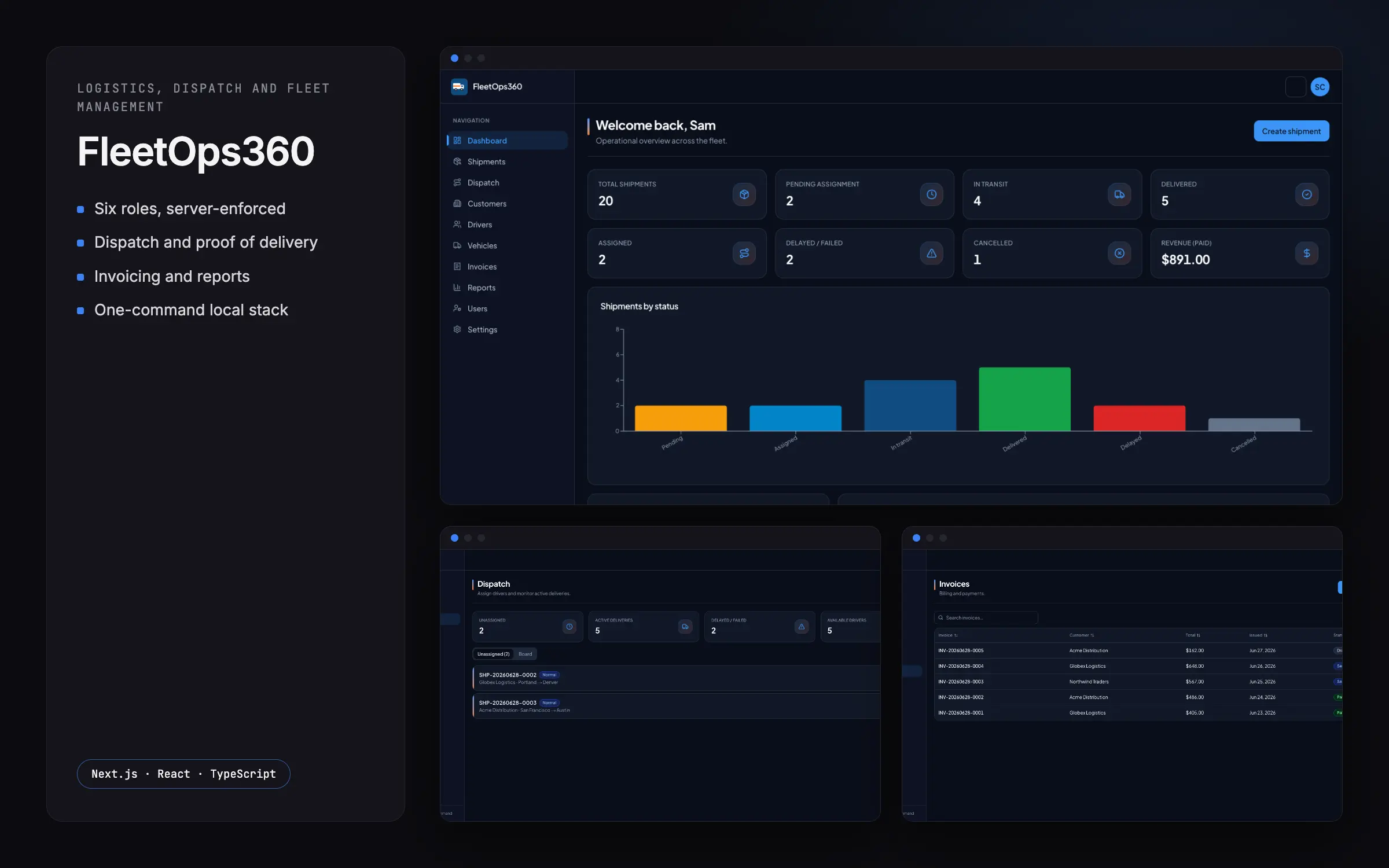
Techparser built FleetOps360, a logistics app for shipments, dispatch, drivers, invoicing and reports, with six roles each seeing only their own work.
- Client
- Techparser product build
- Industry
- Logistics
- Timeline
- Built, available for deployment
- Team
- 1 senior full-stack engineer
Results
- 6 roles
- Super Admin, Admin, Dispatcher, Driver, Customer, Finance
- 3 layers
- Route check, data layer and action guard
- 1 command
- Full stack runs locally via Docker Compose
The problem
A freight business runs customers, shipments, dispatch, drivers, vehicles, proof of delivery, invoices and reports, usually across several tools. Each person needs a different slice: a dispatcher assigns work, a driver sees today's jobs, finance sees invoices, a customer sees only their own shipments, and anyone with a reference number can check a delivery's progress. Techparser built FleetOps360 as one Next.js application, with business logic in Server Actions and no separate API, custom authentication rather than a third-party service, and a whole stack (database, file storage and mail) that comes up locally with one command so it can be self-hosted.
One missed authorisation check would show a customer another customer's shipments, prices or internal notes, or expose drivers' details and private delivery photos and signatures. The public tracking page has to reveal progress and nothing else.
What Techparser built
- A lightweight edge check only redirects signed-out visitors; a data-access layer resolves the user and their permissions once per request, and every Server Action checks the specific permission before touching data.
- Six roles (Super Admin, Admin, Dispatcher, Driver, Customer and Finance) map to resource-and-action permissions defined in one place and stored in the database, so feature code asks for a permission, never for a role by name.
- Whether someone may see a particular shipment is answered by one function, used by both detail pages and file downloads: staff with the right permission, the customer who owns it, or the driver assigned to it.
- Proof-of-delivery photos, signatures and documents live in a private bucket and are served only through an authorised download route that checks access to the record and refuses anything it does not recognise.
- The public tracking page selects only the reference, status, cities, timings and a trimmed timeline. Prices, internal notes, contacts and addresses are never fetched, so they cannot leak through it.
- Only a hash of each session token is stored and the token itself lives in an HTTP-only cookie; passwords are hashed with bcrypt, sign-in takes the same time whether or not the email exists, and password-reset tokens are single-use and expire after an hour.
- Invoices move only along allowed transitions (draft to sent to paid or cancelled) with timestamps on each move, shipment statuses have locked and terminal states, and validation rejects negative amounts and back-to-front delivery windows.
- Shipment and invoice references follow a dated sequence on a unique column, and a clash between two simultaneous requests is retried automatically instead of failing the save. The app, database, file storage and a mail catcher start together with one Docker Compose command.
Decisions that mattered
Authorisation in three layers
One missed check would show a customer another customer's data, so Techparser did not rely on a single gate. A lightweight edge check only redirects signed-out visitors and decides nothing about what anyone may do. A data-access layer resolves the user and their permissions from the database once per request, and every Server Action checks the specific permission before touching data. The trade-off is that the same intent is enforced in more than one place, which is deliberate: no single check is load-bearing, so a mistake in one layer does not open the whole application.
Permissions as data, ownership as a function
Six roles (Super Admin, Admin, Dispatcher, Driver, Customer and Finance) map to resource-and-action permissions defined in one place and stored in the database, so feature code asks for a permission and never for a role by name. Changing what a role can do is a one-line change. Whether someone may see a particular shipment is a separate question, answered by one function: staff with the right permission, the customer who owns it, or the driver assigned to it. Detail pages and file downloads call that same function instead of re-deriving the answer, so access cannot drift between screens.
Withholding by design
Private delivery photos, signatures and prices must never leak, so Techparser built the read paths to expose only what each caller is allowed. Proof-of-delivery files live in a private bucket and are served only through an authorised download route that checks access to the record and refuses anything it does not recognise. The public tracking page selects only the reference, status, cities, timings and a trimmed timeline; prices, notes, contacts and addresses are never fetched, so they cannot leak through it. The decision was to withhold fields at the query rather than hide them in the interface, where they would still travel to the browser.
Outcome
FleetOps360 is a Techparser product build. It is built and available for deployment: shipments, dispatch, drivers, vehicles, proof of delivery, invoicing and reports in one Next.js application, with six roles each seeing only their own work. The whole stack (database, file storage and mail) comes up locally with one Docker Compose command, so it can be self-hosted.
Because authorisation runs in three server layers and permissions live as data rather than role names, what a role can do is a change in one place, and no single check is load-bearing. Because private files are served only through an access-checked download route and the public tracking page fetches only safe fields, a customer cannot reach another customer's shipments, prices or delivery photos. State machines on invoices and shipments, and reference numbers that retry on collision, keep the records consistent as the business grows.
Questions about this project
- What technology stack does FleetOps360 use?
- FleetOps360 is one Next.js and React application in TypeScript, with business logic in Server Actions and no separate API. Data is in PostgreSQL through Prisma, the interface uses Tailwind CSS, shadcn/ui, TanStack Table and Recharts, and files sit in S3-compatible storage. The whole stack, including the database, file storage and mail, runs locally with one Docker Compose command, so it can be self-hosted.
- How does FleetOps360 stop one customer from seeing another customer's data?
- Authorisation runs in three layers. An edge check only redirects signed-out visitors, a data-access layer resolves permissions once per request, and every Server Action checks the specific permission before touching data. Whether a caller may see a given shipment is answered by one ownership function reused by pages and downloads. Private files are served only through an access-checked route, and the public tracking page fetches only safe fields, so prices and notes cannot leak.
- Can Techparser build a logistics and dispatch platform like FleetOps360 for us?
- Yes. FleetOps360 is a Techparser product build, made end to end: six server-enforced roles, dispatch, drivers, vehicles, proof of delivery, invoicing with state-machine statuses, reports, a withholding public tracking page, and a one-command self-hosted stack. Because it is our own product, we can adapt it to your operation or build a new one on the same foundations. Book a call to discuss it.